Soften the background.
Local noise reduction helps reduce room noise and distractions while you speak. It can’t reliably separate you from another person talking.
 VoiceWell
Local by design · Made for Mac
A little less background noise. A little more balance. VoiceWell helps your microphone sound like you, wherever the conversation takes you.
Apple silicon · macOS 14 or later
Public download not available yet.
Make room for your voice
For calls, ideas spoken out loud, and everything in between. Useful tools, without an audio-engineering lesson.
Local noise reduction helps reduce room noise and distractions while you speak. It can’t reliably separate you from another person talking.
Auto Level balances quieter and louder speech, with compression and peak protection. Sudden changes recover smoothly; microphone placement still matters.
A clear app window when you need it. Quick Start, Stop and bypass controls in your menu bar when you don’t.
A quieter kind of technology
Your microphone is personal. VoiceWell processes its audio locally and starts only when you choose Start.
One simple route
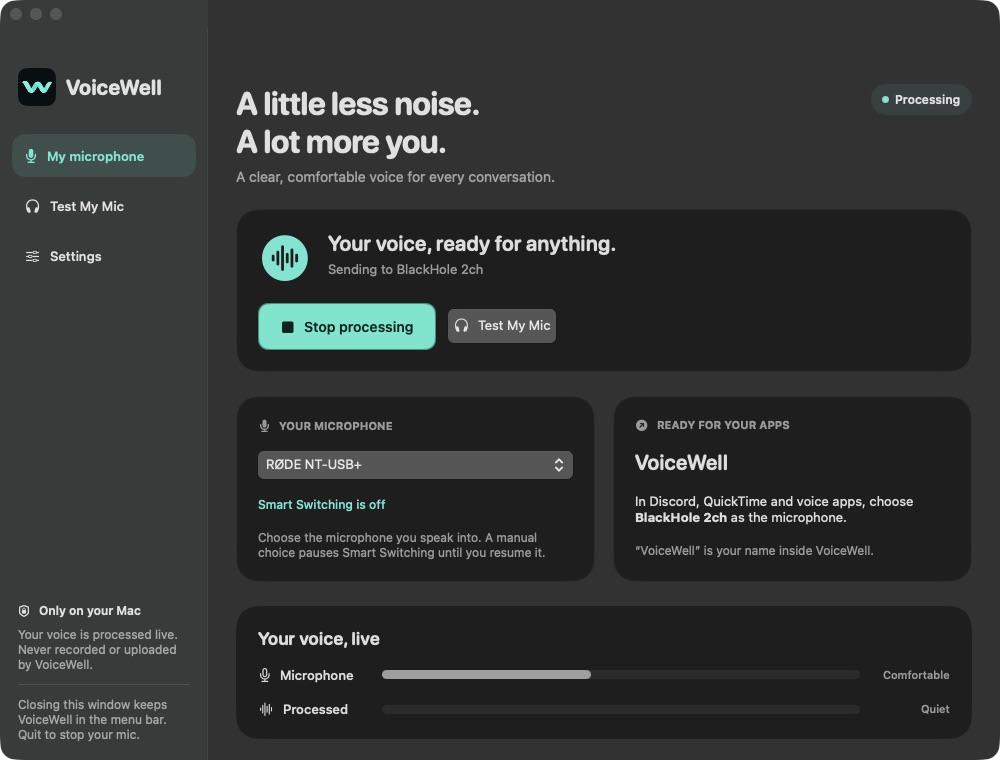
VoiceWell sits between your physical microphone and a compatible app’s microphone input.
Select a connected physical microphone in VoiceWell. Allow microphone access when you press Start.
Keep noise reduction and Auto Level on, or use bypass to compare. The processing stays local.
The current beta delivers through the separately installed BlackHole 2ch virtual audio device.
A friendly name inside VoiceWell doesn’t rename the system audio device. Other apps still select BlackHole 2ch. Keep playback on your usual headphones, never on BlackHole.
The processed route has been verified with an independent local receiver, and the earlier beta was heard live through QuickTime Player.
VoiceWell is being tested in everyday use. A public, distribution-signed and notarized download is not available yet.
Interested in trying it? Request beta access or ask a setup question. Requests don’t guarantee immediate access.
No pricing announced. No payment required to send a request. BlackHole is not bundled with the app.
A few good questions
No. The microphone processing runs on your Mac. VoiceWell doesn’t save or upload your voice. The app you choose to speak into may have its own recording or network behavior. Website forms and hosting are separate; see our privacy details.
The current beta uses that separately installed virtual audio device to deliver processed sound. Your VoiceWell nickname is local to the app; it doesn’t rename BlackHole in macOS or other apps.
No microphone processor can promise that. Overlapping voices may remain, and a digital limiter cannot repair audio already distorted at the microphone or ADC. A sensible input level, good placement and a pop filter still help.
Optional Smart Microphone Switching can use your chosen preferred and fallback microphones, then switch back when ready. It’s off by default. If neither configured mic is available, capture waits safely. Physical dock disconnects and real sleep/wake still need broader testing.
Test My Mic offers live headphone monitoring. It starts muted; raise its separate volume gently. Close the test to stop listening. Muted EarPods output has been verified; audible monitoring with the revised dynamics still needs listening confirmation.
Not publicly yet. Distribution signing, notarization and secure updates are being prepared. We won’t label an unfinished development build as a production download. Use the beta request form above if you’d like to stay in touch.